Giraffes taking a little cruise
Posted By RichC on February 11, 2011
Posted By RichC on February 11, 2011
Posted By RichC on February 11, 2011
“In a free society, government has the responsibility of protecting us from others, but not from ourselves.”
— Walter E. Williams
Posted By RichC on February 11, 2011

Clay Matthews, the hard hitting defensive lineman for the Green Bay Packers and a smooth talking new face for the NFL, made an appearance after winning the Superbowl on the Jay Leno Show (below). After listening to his conversation with Jay, I think he’ll end up comfortably behind a microphone (or in the movies) after his football career is over … I’m thinking someone like Howie Long.
Posted By RichC on February 9, 2011
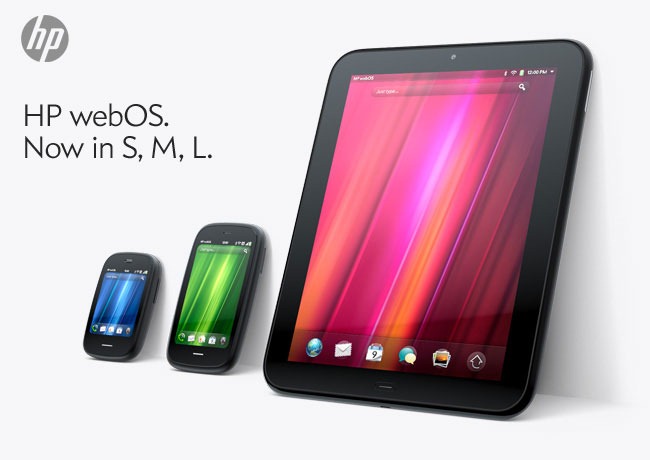
I particularly liked the new advertising coming to my email from HP above … nice! (I’m also including the specs and a couple hands-on first-look videos from Engadget below)
Press Release:
HP TouchPad Brings webOS to the Big Screen
First webOS tablet works the way you do, introduces fun, mobile productivity on larger scale
PALO ALTO, Calif., Feb. 9, 2011HP today enlarged the HP webOS world with the first webOS slate – the HP TouchPad – the breakthrough webOS user interface fully realized in the tablet experience.
With its vibrant 9.7-inch diagonal flush capacitive multitouch display, virtual keyboard, instant-on access, support for Adobe® Flash® Player 10.1 beta in the browser and access to thousands of webOS applications, TouchPad works the way you do and is designed not just for fun but for mobile productivity. It’s ideal for anyone who wants the benefits of the amazing webOS platform on a much bigger scale.
TouchPad is one of the products HP announced today to introduce a unique experience for customers around connected mobility, offering a unified experience for the first time across a variety of devices. It’s one of the building blocks in HP’s vision to seamlessly connect all your worlds through the power of HP webOS.“Today we’re embarking on a new era of webOS with the goal of linking a wide family of HP products through the best mobile experience available,” said Jon Rubinstein, senior vice president and general manager, Palm Global Business Unit, HP. “The flexibility of the webOS platform makes it ideal for creating a range of innovative devices that work together to keep you better connected to your world.”
Designed to be used alone or as a digital companion to your webOS phone, TouchPad connects you and your devices through the elegant webOS experience. Never miss an important call or SMS message – they can be answered and viewed right on your TouchPad. Plus, HP’s exclusive new touch-to-share feature will let you simply touch an enabled webOS phone to your TouchPad to share web URLs.
With the HP Synergy feature, you simply have to sign in to your Facebook®, Google, Microsoft® Exchange, LinkedIn and Yahoo!® accounts and your contacts, calendar and email automatically populate your TouchPad.
TouchPad works the way you do
The TouchPad user interface is a visual representation of your workspace, so you can manage your workflow in a naturally intuitive way that’s easy and fun. The power of webOS true multitasking lets you have multiple applications running at the same time. webOS shows you your activities in the form of cards, not a sea of application icons on numerous home screens.This helps you do all the things you want to do, all at once, so you can listen to music, update your status on Facebook, read email and chat on IM at the same time.(4,7) As you launch new activities, webOS will automatically group related cards – for example, an email and an associated web page – together in a card stack, so you can easily track all related items together.
TouchPad also features a webOS communication suite powered by HP Synergy that keeps you connected and creative, making all of your communications simpler, richer and in your control. It’s a complete solution, including email, instant messaging, contacts, calendar, videos and a front-facing camera for video calling. Connected photo albums make it easy to share and view your pictures directly from popular services such as Facebook, Snapfish and Photobucket. It works seamlessly with TouchPad’s user interface for a natural and efficient experience.
Around the house or on the go
TouchPad offers a great internet experience around the house or on the go, so you can manage your busy life, be productive wherever you are and stay connected with work, friends, family and social networks. It keeps you connected anywhere there’s Wi-Fi for easy access to the web and entertainment.At home, whether you’re watching TV, relaxing on the sofa, at the kitchen table or in bed, you can check in with friends, surf the web, play games or read a book, magazine or newspaper. Amazon.com today announced that it will launch a free Kindle app for HP webOS tailored for TouchPad that will give you access to more than 810,000 titles from Amazon’s Kindle Store. You also can subscribe to popular magazine titles, such as Time, Sports Illustrated, Fortune and People, and download movies and TV shows through the HP Movie Store. The TouchPad music app lets you transfer and play all your favorites from your personal music collection, with amazing sound quality by Beats Audio™. You can start an email, create a message, update your status, search your favorite websites – all before you’ve even opened an application. Whenever you want to do something on your TouchPad, Just Type.
Buy and sell on Amazon.com, do your banking, buy movie tickets from Fandango or check the news. Whether your thing is Facebook, YouTube, Twitter, IM, video calling or email, TouchPad brings it all together with thousands of available webOS applications and the convenience and power of HP Synergy for integrated contacts and calendar to keep your busy life on track.
It’s great for road trips, on a plane, while commuting, in public places, while visiting friends and on vacation. It’s easy to pack, has a long-lasting battery and integrated GPS (3G only), and posting vacation photos is a snap.
Mobile productivity
When productivity is key, TouchPad makes an excellent companion. You can read and write email, view your work and personal inboxes together, or easily toggle between them. Integrated messaging conveniently combines all your text messages, picture messages and IM conversations with one person into a single view, and you can connect through SMS, Google Talk, AIM and Yahoo! Messenger.TouchPad’s virtual full QWERTY keyboard includes a number row, which reduces keyboard switching, making typing easy and fast. It powers on instantly and brings you back to exactly where you left off, whether you were in the middle of composing an email, playing a game or browsing a web page. With webOS true multitasking, it’s like you never left.
For maximum productivity, HP is working with Quickoffice to include the Quickoffice Connect Mobile Suite, which lets you view and edit documents, such as Microsoft Word and Excel. It also comes with VPN support to connect to corporate networks.
With its 1.3-megapixel front-facing webcam, TouchPad offers video calling capability. It’s also compatible with HP’s industry-leading printing solutions, so you can wirelessly print documents, photos and emails to compatible wireless and networked HP printers.
TouchPad has built-in HP Touchstone technology for easy charging, so it’s compatible out of the box with the HP Touchstone for TouchPad (sold separately), and you can charge in either portrait or landscape mode, even without removing the TouchPad case (sold separately). The webOS Exhibition feature lets you run applications designed specifically for Touchstone. Set your TouchPad on Touchstone and Exhibition launches automatically, showing you anything from today’s agenda to a slideshow of your photos.TouchPad is one of three webOS products announced today (see separate announcements for HP Veer and HP Pre3). Each product plays a distinct role in the growing webOS family, designed to meet the varying needs of customers in a rapidly evolving mobile landscape.
Availability
HP TouchPad is scheduled to be available in the summer. Exact pricing and availability will be announced at a later date.HP TouchPad features and specs
* HP webOS
* High-speed connectivity
* Qualcomm Snapdragon dual-CPU APQ8060 1.2-GHz processor
* 9.7-inch diagonal XGA capacitive, multitouch screen with a vibrant, 18-bit color, 1,024 x 768 resolution display
* The option of either 16 GB or 32 GB of internal storage
* High-performance browser with full access to the web, including support for Adobe Flash Player 10.1 beta for access to rich, Flash-based web content
* Wireless connectivity:
o Wi-Fi 802.11b/g/n with WPA, WPA2, WEP, 802.1X authentication
o A-GPS (3G only)(10)
o Bluetooth® wireless technology 2.1 + EDR with A2DP stereo Bluetooth support
* Multimedia options, including music, photos, video recording and playback, and a 3.5 mm headset/headphone/microphone jack
o Internal stereo speakers and Beats Audio
o Front-facing 1.3-megapixel webcam for live video calling
* Email, including EAS (for access to corporate Microsoft Exchange servers) and personal email support (Google Gmail push, Yahoo!, POP3, IMAP)
* Robust messaging support
* Light sensor, accelerometer, compass (magnetometer) and gyroscope
* Rechargeable 6,300 mAh (typical) battery
* Micro-USB (Charging and PC Connect) with USB 2.0 Hi-Speed
* Built-in HP Touchstone technology for easy charging (HP Touchstone for TouchPad sold separately) and HP touch-to-share to share web addresses between TouchPad and compatible webOS phones
* Dimensions: 190 mm x 242 mm x 13.7 mm (7.48 inches x 9.53 inches x .54 inches)
* Weight: approximately 740 g (1.6 pounds)More information about HP TouchPad is available at www.palm.com/TouchPad.
About HP
HP creates new possibilities for technology to have a meaningful impact on people, businesses, governments and society. The world’s largest technology company, HP brings together a portfolio that spans printing, personal computing, software, services and IT infrastructure to solve customer problems. More information about HP (NYSE: HPQ) is available at http://www.hp.com/.
Posted By RichC on February 9, 2011
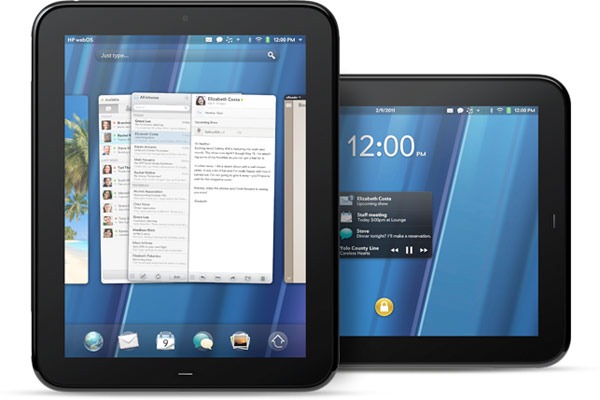
No major shocker from HP-Palm today, who as expected announced new hardware utilizing webOS on a computer tablet; the 9.7” TouchPad was announced today at a San Francisco press event. Technology watchers tweeted with excitement as Jon Rubinstein highlighted some interesting innovations. The “touch-to-share” between devices, where a Palm Pre and TouchPad transfer information from one to the other was pretty unique. Another great feature is the wireless Touchstone charging dock for the new dualcore 1.4Ghz TouchPad. Engadget posted photos play by play from the event today on their LiveBlog.
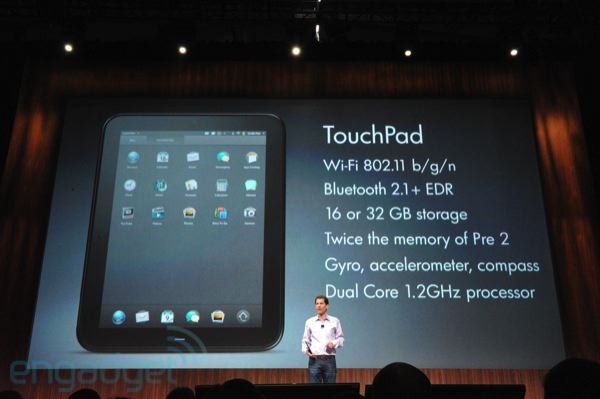


Besides announcing their expected TouchPad, HP also introduced a new cute and tiny full physical keyboard phone called the Veer … a replacement for the Pixi.
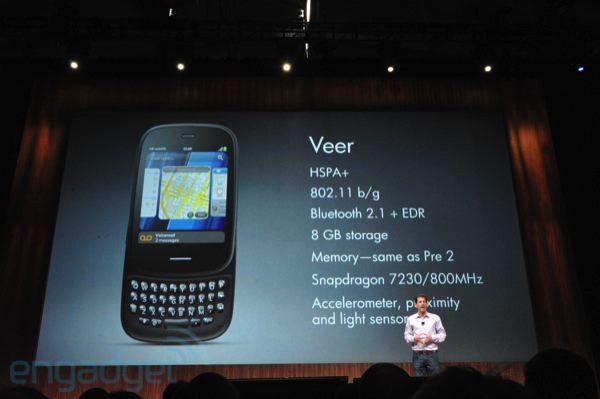
For those of us using the Pre, perhaps the biggest surprise was another new phone called the Pre3 with an even bigger screen and faster processor than the Pre2. I think I’ve found my new phone.
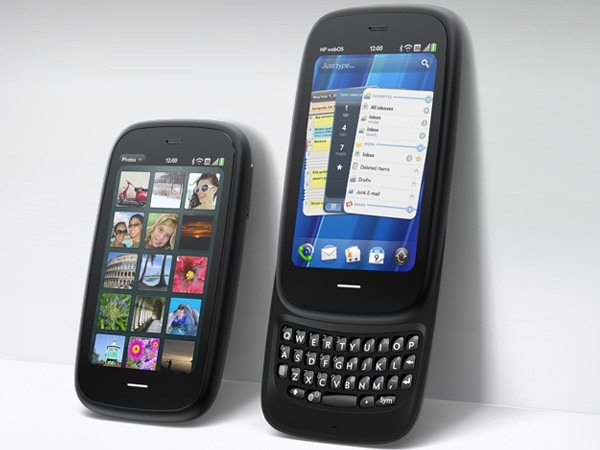

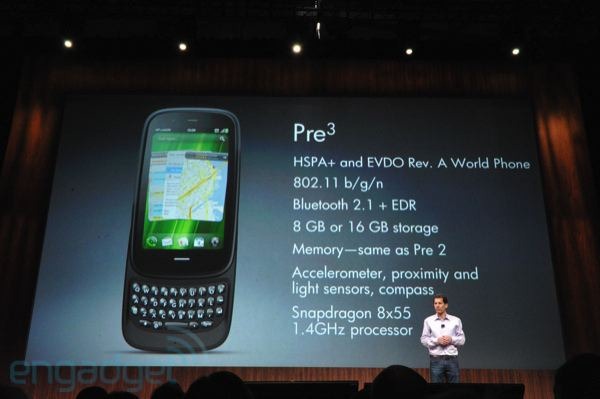
We just had a chance to play around with the Pre 3 at some length… and we have to say it feels good. The body of the device is sleek and solid, and the weight feels good in your hand. The screen is a relatively spacious 3.6-inches, and webOS looks absolutely stunning on it. The extra resolution is a big help on readability and clarity. The slider mechanism feels pretty solid, though there’s a little give just at the end of it that made us slightly concerned. Compared to previous devices, however, it seems far more solid. We’re still messing around with the phone and will report back on what we find, but in terms of hardware quality, HP has taken a big step up here.
— Engadget
Now for the disappointment, it doesn’t look like we’ll be able to buy the new TouchPad or smartphones until summer, even after the remarks made by Leo Apotherker.
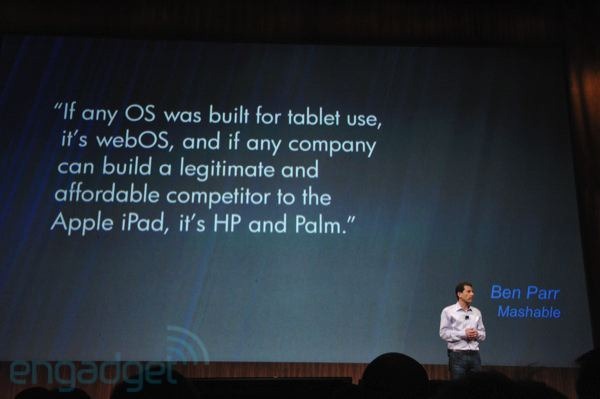
UPDATED – The San Francisco HP-Palm event:
Posted By RichC on February 9, 2011
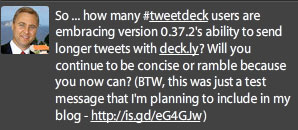 The latest install of the Tweetdeck (v0.37.2) Twitter client added a new feature, a shortcut link called deck.ly, that allows for longer messages. Although the feature enables significantly more text to be included in a tweet, it does take away from the simplicity of Twitter … and the necessity to be concise. Personally I doubt that there will be many embracing and “following” those who regularly send long messages, but we’ll see.
Since the feature works seamlessly for those using Tweetdeck (v0.37.2), deck.ly messages show up in the Twitter client. For those using other clients or web-based tools, the shortcut link appears enabling readers to click on and view the entire text as with the screenshot below.

Here’s the video explanation:
Posted By RichC on February 9, 2011

I didn’t put the cover on the pool this winter and so I’m able to see the damage to the ceramic tiles as it happens. With all the snow, rain and freezing temps, the winter weather is having fun snapping off tiles more than usual. Looks like I’m in for some work and pool repair this spring (I should probably try to fish the tiles out before they sink to the bottom?)
Posted By RichC on February 8, 2011
An EAA284 friend of mine enjoyed riding along on a Pilots N Paws rescue flight the other day and made a nice video too. Although I could just link to his site or the YouTube video, its enjoyable enough to include on my blog. It is great to see pilots using their time to help others … be they people or pets. Great video Steve and forward a “well done” to your friend Mike. (video below)
Posted By RichC on February 7, 2011

Noticed a little snow driving to the grocery and then came out to see it covering the cars and the streets. Surprised me.
