Guide to Speeding Up Your Windows PC’s Startup – Lifehacker

Posted By on December 29, 2009

Reposting something that might be helpful for those looking to gain a bit of speed back from their aging Windows based computer. The aging problem seems to happen to computers just as it does to people.

You just hit the power button your PC, and now you’ve got enough time to brew a fresh pot of coffee for the entire office—because that’s how long it takes for your computer to go from “on” to “ready to work.” If your PC’s bogged down by a bunch of programs that automatically start up when it does, it can take forever to get started every morning. Without a major hardware upgrade, there’s not much you can do to cut the time it takes for Windows to actually boot—but you can trim and tweak the amount of time it takes for your desktop to get to a working state. Let’s take a look at a few ways you can cut your Windows’ desktop’s loading times using built-in utilities and third-party tools. When you install a new piece of software on your computer these days, more often than not it will set a little bit of itself to start up automatically when your PC does, either to check for updates, make it seem faster, or just remind you that it’s there at all with a little icon in your system tray. Problem is, when you install lots of software but don’t use it all, these little startup entries can suck away CPU cycles, memory, and time. Reclaim them by removing the ones you don’t need.

Remove Startup Items Without Downloading a Thing

While many programs promise to clean up your startup for you, you can make quite a few adjustments in Windows itself, without using any kind of extra tools. The best, safest, and most basic place to start is in your Windows Start menu’s Startup program group. Navigate to it and see what programs appear there. Right-click on any one and choose Delete if you don’t need it starting up on its own.
Once you’ve done that, it’s time to bring out the big guns. Windows can also start up items planted in your registry automatically. To see what those are, from the Windows Start menu, choose Run…, and type msconfig then hit Enter to start the Windows System Configuration Utility. Switch to the Startup tab to see a more comprehensive list of what’s starting up automatically. Here’s what it looks like. Now, this list can seem opaque and confusing. What is ctfmon or RTHDCPL? The command column, which sometimes lists a full path to the item’s location, can sometimes give you a clue as to what the heck an item actually is. As always, Google is also your friend in these situations. From here you can uncheck items to stop them from starting up. Don’t uncheck stuff just because you don’t know what it is; uncheck stuff you know you don’t need. For instance, if you’re not a big iTunes or Quicktime user but you’ve got the installed for occasional use, uncheck QTTask and iTunesHelper.Once you’ve unchecked items in this utility, when you restart your computer, Windows will prompt you, saying that it’s using “selective startup.” That’s ok—you can always renable items by typing the msconfig command in the Run box again.
Messing with msconfig takes somewhat of a brave and savvy Windows user, but a few third-party Windows tweaking and cleaning tools offer startup managers that are more user-friendly.

Download and Run a Startup Cleaner Utility

There are literally a gazillion Windows tweaking utilities that include startup management capabilities, but lets take a look at two good ones. CCleaner (which stands for “Crap Cleaner”, see our original review) can scan your system for all sorts of extras and get rid of them, but you’re interested in the Startup manager. Hit the Tools button, then the Startup button to get there. Here’s what your list will look like. As you can see, it offers a little more information than msconfig above (in the Program and File column), and that may help you decipher what’s program is what. You can disable and delete items from your Startup using those respective buttons. If you don’t want to install more software in order to clean up your system (which makes sense), System Explorer (see our original review) offers a portable version, and its startup manager is beefy, with hooks into the registry, an online virus checker, and even Google searches for file names. In the System tab, hit the Startup tab to take a look at what’s auto-starting on your PC. Here’s what it looks like. As you can see, using the right-click context menu you can go straight to the registry editor, or do a search on ProcessLibrary.com or Google for the item. Also, the program’s publisher and file path are included, which offer more information about what’s what and what you can afford to disable. Besides CCleaner and SystemExplorer, Lifehacker readers also like MZ Ultimate Tweaker and RegToy.

Delay Item Start to Get to Work Faster

Of course, it’s not that one program that’s starting up automatically and slowing down your whole PC—it’s all of them in aggregate. You may audit your startup list and realize that yes, you do want all these programs to start. But maybe you don’t need them to start up at the exact moment you’re dying to get into Outlook and read your email, or work on that urgent report. The Startup Delayer utility (our review) does just that—it delays items from starting up from anywhere from 20 seconds to several minutes to hours so you can start working sooner. For instance, if your printer driver pre-loads but you’re not printing the moment you log on, you can delay it for a minute or two. Similarly, I really don’t need the Java Updater process starting its work before I do, so it is a good candidate for delaying. Here’s what Startup Delayer looks like.

Don’t Fall for the Myths

There are a lot of myths and misconceptions and misguided “secrets” to speeding up your PC published out there. Don’t fall for them. If you delve deep enough into Windows optimization tips online you’ll find tips about deleting page files, cleaning out your registry, setting your PC to use multiple cores manually, and lots of other authoritative-sounding tweaks. Before you do any of that, check out the How-To Geek’s awesome guide to debunking Windows performance-tweaking myths. Have you had any startup editing revelations? What’s your favorite PC startup speed-up utility?

Posted via web from richc’s posterous

Interesting notebook computer observation – via Posterous

Posted By on December 28, 2009

external with notebook

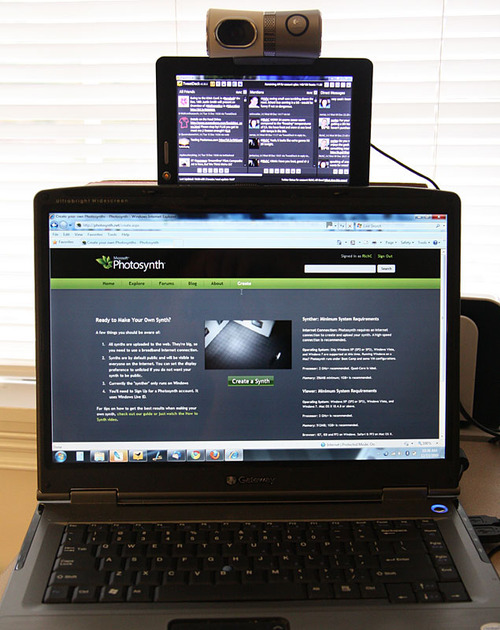
As mentioned earlier, my primary Gateway NX570XL notebook computer is having LCD screen related problems. I ordered a new inverter board prior to Christmas that would have been the least expensive repair, but the item that was shipped was incorrect — much larger (longer) than the one on my computer (photo below).

One of the interesting finding is that of computer speed. When running the computer with  both the  ‘super’ dim LCD and external monitor all speeds were as usual. When I disassembled the notebook, removing the LCD panel and unplugging, the attached external monitor’s resolution began natively higher (now1280x1024) AND the computer now runs significantly faster than it did previously. The external is a Samsung 170s (older) but the quality is very good with the added benefit of more pixels and more speed. Besides the loss of portability, it is nice having increased response and speeds.

I’ve ordered an entirely new replacement LCD screen in hopes that I can repair it … and for those who have successfully replaced the backlight tube, I take my hat is off to you — it’s no easy task.

old new inverter

Posted via email from richc’s posterous

Reusing the Keurig one cup K cups for making coffee

Posted By on December 28, 2009

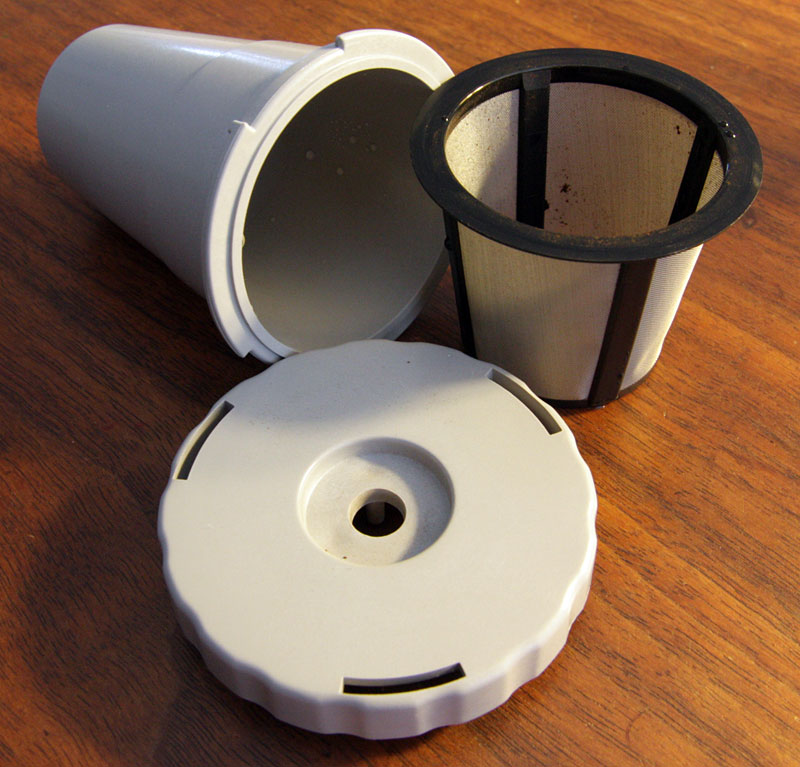
Reusable KcupThanks to my wife Brenda, who gave me a Keurig one-cup coffee maker for Christmas, I’ve been enjoying fresh coffee every day since Friday. In my opinion, the new Keurig brews coffee as good or better than most coffee shops. The engineering beauty of these design is that the hot water and steam stays in the small prepackaged “k-cups” of coffee, brewing the fresh sealed grounds at the correct temperature and time producing a near perfect cup of coffee. These “k-cups” can be purchased from a variety of coffee brewers, including one of my favorites, Caribou coffee — but they don’t come cheap. For those of us that drink multiple cups of coffee each day, this is method is not the most cost effective way to make coffee.

The options to expensive pre-packed k-cups  as I see it are:

  1. Purchase a removable, washable and reloadable cup that fits the “k-cup” slot (photo above). Keurig CoffeemakerThis works pretty well, but I noticed some overflow due to either my use of too many grounds or the lack of a seal on the top? Still, I have it working fairly well if I only want to make a smallish cups of coffee (the Keurig model I have makes two sizes — small and medium). As for sizes, I do wish there was a large mug option … although running two smalls through one k-cup does work, but unfortunately produces a relatively weak cup of Joe.
  2. Purchase replacement plastic lids (see My-Kap)  for a used k-cup that has been cleaned out. This may be a decent option, but does require peeling or cutting off the foil and buying a box of plastic snap on lids.
  3. Use a small square of GLAD Press’n Seal® wrap to reuse a washed out k-cup. So far this works well although isn’t the most convenient. What I do like about this technique is that it’s “cheap,” and allows me to use my 1/2 decaf, 1/2 caffeinated blend of Sumatra coffee that Caribou grinds for me.

glad press n seal

Click slide show below displaying a series of photos of how I used the GLAD Press’n Seal® wrap to reuse Keurig K-cups.

Palm webOS 1.3.5 due today: Speed, Battery, App Limit all to be improved

Posted By on December 28, 2009

Today should be the rollout of the newest Palm webOS, version 1.3.5. Check your updates later in the day.

CEO Jon Rubinstein just confirmed that webOS 1.3.5 is coming soon and will have a bevy of improvements, including:

  • Allowing for installation of more apps
  • Enhances WiFi and app performance
  • Improved battery life
  • Increased speed and responsiveness on the Palm Pixi

We’re still listening in and hearing good things about what’s coming. Namely: Palm will showcase the Ares development platform and other developer initiatives at CES, they expect “thousands” of apps “in short order,” and they have another set of marketing initiatives that they’re planning on unleashing soon. 

Posted via web from richc’s posterous

EAA News – SubSonex Heat Wave

Posted By on December 26, 2009

See Sonex Aircraft Hornets’ Nest Research link or EAA.org article below.

Sonex jet runs engine for the first time

December 23, 2009 — The SubSonex, a jet-powered homebuilt aircraft being developed by Sonex Aircraft, LLC, completed its first engine run last week at the company’s Oshkosh, Wisconsin, headquarters causing warm smiles and melted snow. Sonex Founder John Monnett said the aircraft features a new Czech-built engine that has shortened the development time frame of the aircraft, which led to the wintertime test.

“We just wanted to see what the flame front out the back end and make sure we weren’t having any problems of melting the tail off the airplane,” said Monnett, whose main focus as of late has been the jet project. “We did run it up to 100 percent after a few starts, we were cautious, and we melted a lot of snow.”

The PBS engine (První Brnenská Strojírna Velká Bíteš, a.s. TJ-100) was delivered a week ago. It’s bigger and more powerful than the original Heward engine that was seen when the aircraft was unveiled at EAA AirVenture 2009. The Heward was designed for radio-controlled applications and currently lacks the engine controls systems that the PBS has since it’s a “legitimate production engine,” according to Monnett. PBS is certifying the engine to Czech civil aviation standards.

The TJ-100 is used in such applications such as Auxiliary Power Units, (APU) and on drone aircraft. On a SubSonex, it will produce as much as 240 pounds of thrust and is the same engine used by the Super Salto powered sailplane that has performed at AirVenture in the past. To use the new engine Monnett said they had to reconfigure the entire aircraft, including new engine mounts, engine controls, and boost the electrical system to 24 volts.

The successful engine run may lead to a test flight soon once minor tweaks and FAA certification is completed. Monnett says the SubSonex is basically ready to fly and the first flight will likely come as soon as Wisconsin winter weather and runway conditions are optimal.

Starting a turbine engine
For the un-initiated, starting a jet engine takes several steps. Depending on the engine, those steps are done automatically or with some input from the pilot. On larger, multi-stage turbine engines the starter turns the core of the engine first and the igniters fire immediately. After the core has reached a certain RPM, fuel is introduced and the engine “lights off” and accelerates, becoming self sustaining much like a propane torch. Since the TJ-100 is a one-stage turbine, its start sequence is slightly different, saving the fuel and ignition for last once the Electronic Control Unit (ECU) has determined that engine systems are functioning normally. Monnett says that the engine may be small, but it still has the unmistakable sound of a jet.

Posted via web from richc’s posterous

Senate approves unpopular healthcare legislation

Posted By on December 24, 2009

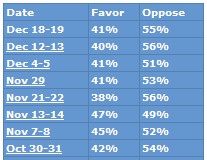
The year 2009 is closing with our federal government’s Christmas present making big changes in America’s healthcare system. Today, the senate passed legislation moving a massive 2000+ page healthcare bill one step closer to law and will in essence give significant control of over one-sixth of our nation’s economy to bureaucrats. Although rasmussenpoll_healthcaresupposedly promising needed change to a system that has seen healthcare cost escalate in recent decades, the new mandates will take  control and decisions from American citizens and put it in the hands of Washington politicians – rarely a good thing in my opinion.

Let’s start with the mandate:
The new government proposals will require all citizens to care health coverage who are "deemed able to afford it." If they don’t carry it by 2014, penalties will be assessed initially in the form of a "$95 fee" in the first year. By 2015, the penalty is $495/year and $750 in 2016 – low or no income need not worry, an insurance policy for you and your family will be provided, courteous of the taxpayers. Higher income earners choosing to resist paying for health insurance that meets government minimums could face a penalty of 2% of their income up to the cost of the basic insurance plan.

healthcarecartoon091224

As for basic plans, insurance companies that sell new policies next year will no longer be able to place lifetime caps on coverage and will lose their ability to set annual limits on benefits. The insurance companies will have to pay the entire cost of preventive services such as mammograms, colonoscopies, flu vaccines and assistance to people trying to quit smoking (good luck finding an affordable plan). Notice the above denotes new insurance plans; if you are one of the more than 160 million that are covered by existing plans, you will be grandfathered into the old plans and won’t have to adopt such changes – you’ll be welcome to keep the caps on coverage and can continue to live with the limits in your existing plan (so long as your company participates and you keep your job).

An immediate benefit being negotiated on your behave is one that helps Medicare beneficiaries falling in the ‘doughnut hole’ and in need of name brand prescriptions – how about a 50% discount on their cost? The biggest change will come in 2014 when the penalties kick in, that’s when the government will start to hand out tax credits to low- and middle-income Americans to offset the cost of buying insurance and expand the Medicaid federal-state program to provide insurance to a greater swath of the poor. $$$ (can I type enough dollar signs?).

A few items that will affect those who responsibly plan, is the $2500 limit on the flexible spending health saving accounts – these are the pre-taxed dollars many set aside for managed medical expenses throughout the year. Another comes in 2013 and targets people with insurance plans worth more than $8,500 for an individual and $23,000 for a family. These individuals will face a new tax of 40% on the amount of the benefit that exceeds those levels. Expect the insurance companies to reduce the benefits in their plans to avoid these taxes (commonly referred to as Cadillac plans).

The major goal for insurance companies will be to get as many healthy people “paying” into the system by 2014 or shortly thereafter AND before taking those adults who many pre-existing conditions. Insurers in 2014 will no longer be able to charge older people significantly more than the lowest insured; the number for older adults is maxed at  three times. Also in 2014 look for the new state insurance exchanges where people without employer plans and small businesses can shop for coverage. In addition to plans from private insurers, the exchanges supposedly will offer plans administered by the same entity that handles insurance for government workers.

In theory getting this kind of health coverage sounds great, does it not?

  • Everyone will have insurance and the government pays, not only emergency care, but for well-care insurance for those who can’t afford it.
  • Require insurance companies offer unlimited coverage and no denials for pre-existing conditions.
  • Set prices so the elderly pay a maximum only three times that of a young healthy individual.
  • Offer assistance for brand name drugs and tax credit assist to low and middle income Americans so they can buy insurance.

Let’s for a moment believe that government control medicine was indeed best for America … how does this:

  1. save money,
  2. improve quality of healthcare
  3. guarantee efficiencies

By the way, don’t get me started on the sweetheart deals being made for votes or the fact that $500,000,000 is being cut from Medicare and Medicaid and will be shifted to states … that’s for another post. For now, Merry Christmas from those working and listening to you in Washington DC [/sarcasm].

Looking forward to reading Pirate Latitudes by Michael Crichton

Posted By on December 23, 2009

It was great to have an annual Christmas exchange lunch yesterday in this ‘slower than usual’ week before Christmas. Thanks to my friend Jeff, who knows me well,Pirate Latitudes I now have a new book — Pirate Latitudes — a perfect gift selection for me.

Pirate Latitudes was written by best selling author, and one of my favorite fiction adventure writers, Michael Crichton. At the time of his death on November 4, 2008, this book was one of a couple that were left unpublished, and perhaps unfinished, on his computer. His publisher, Harper Collins, has edited this work and is publishing the books posthumously.

Pirate Latitudes was supposedly written back in the mid- to late-1990’s and was being considered to be the basis of a videogame. The adventure story sets a pirate named Hunter with the governor of Jamaica in a plot to raid a Spanish galleon’s treasure. According to reviews, the novel was well researched and has “great detail about navigation and how pirates operated.” Thanks again Jeff, I’m looking forward to escaping my recent trend of reading military history and Afghanistan strategy books and turning to the more enjoyable “factual fiction” reading.

Don’t eat a lot, but drink and be merry this holiday season

Posted By on December 22, 2009

It’s not all bad news as we wrap up 2009.  Americans have been criticized for their unhealthy eating habits and rightly so, but there are a few abused items that are getting a green light. The silver lining for those who drink, is that studies are suggesting that certain favorite drinks are medically helpful, some could even prove to be cancer fighters.

I cheered the other day when an Australian coffee and tea study came out suggesting that those who drank 4 cups a day had a 25 per cent reduced risk of type 2 diabetes, and that those drinking more than six cups a day had a 40 per cent risk reduction. This is really great news for me as Smiling Coffee CupI put a new coffee maker on my Christmas list! For those not coffee or tea addicts, you’ve not been left out either. It seems another overseas study suggests that drinking beer may help men ward off prostate cancer (not much science behind it though). As if that’s not good enough, how about you heavy drinkers … well you can just point to a Spanish study suggesting that men who drink alcohol have a least a third lower incidents of coronary heart disease than non-drinkers.

So there you have it … don’t eat, but drink and be merry this holiday season!

Gateway notebook computer problems

Posted By on December 21, 2009

One would think that I would have learned my lesson with Gateway notebook computers a few years ago when I replaced my well traveled lightweight computer after first power plug, then keyboard and finally USB port issues … unfortunately I didn’t.Monitor problem with Gateway NX570xl I reluctantly replace it with a higher performance model which started off irritating me right out of the box with swapped ctrl and function keys. Since then, I’ve had to replace the keyboard, the battery, the hard drive and have just lived with a defective (in my opinion) overheating processor. That said, the NX570XL notebook has worked out well, and although a bit heavy for my everyday use, the faster processor has provided enough performance to run a few processor intensive programs.

This past weekend though, it has become unreliable once again. This time the LCD screen has darkened and become extremely dim — it has pretty much gone black. With a bit of research it looks to be either the backlight, the inverter or the actual LCD screen — although I doubt that since the image exists on the display IF a light is correctly positioned. I’m not anxious to send the computer in for repair, nor do I really want to spend all that much time or money diagnosing  it on my own, one part at a time.

What to do, what to do? Even if I were anxious to replace the computer, I’m not sure what brand or ‘size’ I would purchase? (I should be glad for a light “non-traveling” work week)

Geoff Holt sailing the Atlantic at Day 8

Posted By on December 20, 2009

For need of inspiration, I’m following a British sailor on his boat Impossible Dream with a few more physical challenges to sailing than most of us. Geoff Holt has refused to let being a quadriplegic prevent him from attempting a sail across the Atlantic, although is finding it challenging. I’ve been following his upbeat attitude in getting his sea legs comfortable with life in a wheelchair at sea while facing the rolling swells from the UK to the Cape Verde islands. Impossible Dream arrived there this weekend according to a recent ‘tweet.’ Below is his Day 8 video log post.

Fair winds Geoff Holt … and my admiration to his crew Susana as well.

Desultory - des-uhl-tawr-ee, -tohr-ee

  1. lacking in consistency, constancy, or visible order, disconnected; fitful: desultory conversation.
  2. digressing from or unconnected with the main subject; random: a desultory remark.
My Desultory Blog