High CalendarAgent CPU use on Apple MacOS Catalina 10.15.3
Posted By RichC on February 12, 2020
Here’s a tech tidbit for those noticing a high CalendarAgent CPU demand on your Apple Macintosh computer. For me, the process cranked  up the CPU to 60-70% trigging high fan speeds and this process continued without finishing. I noticed slightly sluggish behavior AFTER a recent MacOS software update, although might have happened prior to that? I’m currently running Catalina, but from my digging, this excessive database processing can happened in several earlier versions too.
The solution for me was to kill the process and then rebuild the Calendar database. I actually stopped both the Google Calendar and Apple Calendar before rebuilding – perhaps doing both was unnecessary?
Here is what I found in Apple StackExchange:

If you need a little more clarification, see below:
- Open SystemPreferences => Internet Accounts

- Uncheck “Calendars” for each account (both iCloud and Google in my case)
- Open the “Terminal” app and remove the preferences calendar db files
- Go back to SystemPreferences => Internet Accounts and check “Calendars” for each account for each service and calendar databases should rebuild
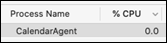
- Check to see that CalendarAgent process returns to 0 % CPU use.

rm -r ~/Library/Calendars/ ~/Library/Preferences/com.apple.iCal.plist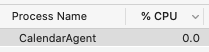
Comments