Sloooow down … it hasn’t been announce just yet (1PM EST), but the rumors are swirling that today, Monday December 18th, Apple Computer might just announce a long anticipated combo phone and media player. I’m not sure what it will look like, but was surprised to see that Cisco/Linksys has a VOiP phone call the “iPhone.” I suspect that a few see the “iThis” and the “iThat” as Apple product? Nevertheless, most in the industry are calling whatever is coming from Apple the “iTalk” … which I believe is pretty much confirmed? Interestingly I did spot this interesting ‘concept’ advertisement. I’m not sure its what I want, but design wise … its something only Steve Jobs and Apple Computer could pull off.
EDIT 12/19 – Nothing as of yet. If the rumor of an iPod phone interests you, here is an interesting link.
As another day passes and a new day of searching begins, the nation waits for news from rescue efforts on Mt. Hood. Yesterday (Sunday), was the first clear day of searching since the wicked storms battered the Pacific Northwest, and one of the 3 missing climbers was found, unfortunately not alive, in a snow cave. Another cave was found with only equipment and a sleeping bag which leaves two climbers yet to be accounted for. The prayers of many following this grime situation are with those families waiting in agony. I’ll include a Sunday evening “what is known so far clip” from FoxNews.
A “new beginning” … the translation sounds better than the Mel Gibson movie titled “Apocalypto.” My wife and I intended on going to see this movie last night, but unfortunately didn’t make it. (I had planned on a review here) 🙁
So in lieu of my review I’ll post part of a long interview that Mel Gibson had with FoxNews and Sean Hannity. Mr. Gibson is an interesting fellow. As expected, the “passion” he puts into most of his project is apparent without even seeing this movie. From the sounds of the fast pace, violence and impressive cinematography, I expect to come away worn out. I’m concerned about the subtitles though; maybe we’ll see it over the long Christmas or New Years weekends? (warning … the following Quicktime clip runs 18 minutes)
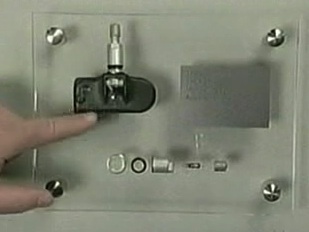
In our local CinciTDI Volkswagen car club, this past week we had a discussion on ‘tire pressure monitoring.’ I’m not sure all of the answers were correct, but found it interesting that Pat Goss of Motorweek had a segment about it in this weeks program. Although I didn’t find the comments as complete as the could have been, seeing the ‘stem’ with the pressure sensitive electronic sending unit was helpful.
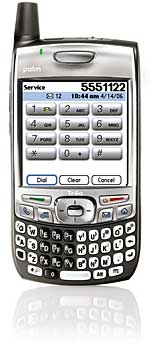
Attached below is a segment of a letter that a Steve Sinclair, a Palm senior product manager, wrote to TreoCentral in regard to a needed (and seemingly long awaited) update for the Treo 700p. I’ll link to a PDF copy of the full letter, but cut to the chase by posting the important stuff like:
1) Bluetooth compatibilty,
2) Stuttering music playback
3) lag in switching applications
Mr. Sinclair, Sr. Product Manager writes … Dissatisfaction with Bluetooth performance is clearly a top customer issue and our technical team has been working to overcome Bluetooth hardware limitations to deliver improved performance on the 700p. Tops among these is improving the stability of the Bluetooth connection between the phone and the headset/carkit. We hope to have a patch specifically available for Bluetooth early in the new year assuming it passes through all its certifications and is approved by the carriers. At that time, we’ll be able to publish an updated compatibility list, but to be upfront about this, the number of devices we have time to test is limited, so some users may still be disappointed that their headset or carkit isn’t listed. That doesn’t mean it doesn’t work – it just means we didn’t have the resources to test it.
Stuttering during music playback on the Treo 700p can occur when another app or system activity takes priority over the digital audio stream playback. For example if you have another app running in the background (like Versamail), it will kick off radio activity that takes precedence over the music playback activity, thus causing a stutter or skip. This is another area where we are making some changes in audio buffering although the stuttering won’t be 100% eliminated on this particular device. These changes will be released as part of a formal ROM update planned for availability in late Q1 2007. That 700p ROM update will roll in the Bluetooth patch I mentioned above as well as a number of other enhancements to system stability, reliability and performance. It takes time to make sure we haven’t broken anything in the process of fixing issues, and I’ll add the caveat again that it is up to the carriers to test, certify and release the ROM update before it can be released to customers.
The last issue mentioned in the letter is a lag seen when switching between apps which is apparent to upgrading customers who are used to faster response times on other Treos or Palm handhelds. This lag is noticeable for some because it is taking longer than desired for the databases of the previous application to close and the databases of the next application to open. Aside from working with 3rd-party developers to minimize the lag while switching to/from their apps, there isn’t much we can do to alleviate this as it is partly a result of the shared hardware design between the Treo 700p and Treo 700w/wx. I don’t want to sound like I’m dismissing the frustration this is causing for some power users, but it has not been reported by a significant portion of our customer base.
…
Hurry please … especially on the bluetooth as neither my Motorola or Jabra is all that great with the Palm Treo 700p.
🙁
I see a theme coming — maybe a ‘tech tip Friday? After posting the comment on how to save YouTube files yesterday, I received enough emails to suggest that at least a few readers liked what they read. One of the emails asked answer another question and I told him I would address it today. (I’m by no means a computer guru although prefer the ego boosting label – ‘power user’)
😀
Well here it goes — Jim R. said that his Win XP notebook had a full hard drive with the excess of bloated programs, digital photos and video content. He was cleaning out to create space and found a file that was huge that he could delete and suspected a virus or something. He asked how to delete a file in the root of his C:\ drive called “hiberfil.sys.”[C:\hiberfil.sys]
First, it not a nasty file or anything to be concern about except that it takes up precious hard drive space. It is the file that the Windows operation system uses to store information it needs to recover from the special shutdown state known as “hibernation.” Depending on what was running before hibernating your computer (or auto hibernating), the file can be pretty large — well over 1GB! What happens in XP is that your computer takes a snapshot of everything and records it to disk so that everything will come back when you restart from hibernation. (great feature in XP, BTW … and that’s a comment from a Macintosh lover)
The file basically contains everything that was in RAM (memory) and then writes it to the hard drive labeling it hiberfil.sys. This isn’t something you must use and there are way to turn it off if you don’t use it:
— Open the Windows Control Panel
— Double-click Power Options
— Click the Hibernate tab, de-select the ‘Enable hibernate support’ check box, and then click Apply.
— Restart your computer and hiberfil.sys will be automatically deleted.
What if you want to use it again? Well the easiest way is to go to the Windows Help & Support Center [click START and look near the SEARCH and RUN selections] by searching on the term ‘enable hibernation’ there will be instructions on how to reactivate the hibernation. Hope this helps those of you trying to save that precious disk space … but my advice for desktop users is to add a mega-giga external hard drive because files aren’t getting any smaller; besides, additional storage is pretty reasonable.
I was asked if there was a way that someone could save videos from the popular video serving site YouTube and the answer is yes. About 6 months ago as I used a screen capture utilities like TechSmith’s Camtasia Studio(version 4 is the current release), but … recently I found that there are much better online techniques. One online site that does a pretty good job is Vixy.net. Its a relatively painless way to create a different ‘wrappers’ for YouTube videos. You copy the URL of the video and paste it into Vixy and voilà … you have a saved .mp4 or Democracy Player ready clip. By using the tabs, there are other conversion option and after a click it is downloaded to your computer. The file can be save, viewed or posted.
I’ve put a Quicktime wrapper around a CBS Craig Ferguson clip that I have posted below. I expect will soon be taken down considering its CBS material? I used the comic relief in a BiodieselNow forum post in part to stimulate debate on global warming issue. Towards end of the routine, a joke is made about the latest in “cow flatulence.” Lunch break is over … time to get back to work.
🙂
Someone sent me a video link of a nice looking yellow New Beetle ‘losing it’ around a curve. Thanks to the safety engineered into every Volkswagen, the driver was able to walk away with only embarrassment. Nevertheless, the cosmetic damage to the car looks to have dented, scraped or scratched about every surface.
Maybe I’m showing my age in referencing “feet” with the slang term “dogs.”(The American Heritage® Dictionary of the English Language, Fourth Edition. Houghton Mifflin Company, 2004.) Where did that term come from anyway? Recently I’ve noticed that my favorite shoes (Rockports) are showing signs of wear. As I contemplate replacing them, I wanted to see what other options are available to fit that comfortable, casual, walking type shoe design. I’m tempted to just go out and buy another pair of Rockport shoes since I’ve has such good luck with them.
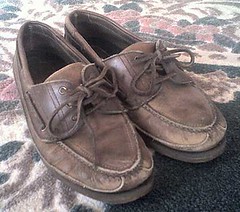
When I was younger, the old canvas Converse All-Stars were the shoe of choice and it wouldn’t matter the weather or occasion — I just had to wear them. Then in college I became a boatshoe (see Sperry Topsider) ‘nut’ which lasted until the requirements of work dictated a more refined shoe, although still found myself slipping on the boat shoes even when I wasn’t on the boat. As you can see, I still wear a version of the this shoe with beefed up soles, but I’m finding that in a very short time that I’m not comfortable. As for comfort, it is hard to beat some of the modern athletic shoes. I’m probably not alone in having tried several brands over the years. The Nike shoes are a little snug, but still comfortable, but have found that the New Balance are my favorites. They seem well made, are comfortable and hold up very well.
Summer boat, pool, beach and deck wear has recently shifted between my Crocs (which I mentioned in a previous post) and the Nike sandals.
Both are amazingly comfortable although I have found that the sandals are better for ‘hot’ feet in the summer. Crocs for all their comfort, do tend to make bare feet sweat — but with a sock all is fine. Frankly its hard to find a better slipper.
Before I rush out and try to get a pair of Rockports after Christmas … let me know if there is another brand or shoe I should consider.
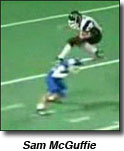
With Ohio State ranked #1 and playing for the National Championships this year … and the Cincinnati Bengals handily beating the Oakland Raiders … football is on my mind. So, when I ran across this clip of a high school football game in Texas, I decided to post it below. The impressive running back is Sam McGuffie and his aestheticism is something to behold; one wonders where he’ll end up play college football?
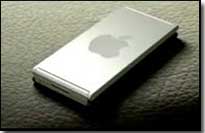 Sloooow down … it hasn’t been announce just yet (1PM EST), but the rumors are swirling that today, Monday December 18th, Apple Computer might just announce a long anticipated combo phone and media player. I’m not sure what it will look like, but was surprised to see that Cisco/Linksys has a VOiP phone call the “iPhone.” I suspect that a few see the “iThis” and the “iThat” as Apple product? Nevertheless, most in the industry are calling whatever is coming from Apple the “iTalk” … which I believe is pretty much confirmed? Interestingly I did spot this interesting ‘concept’ advertisement. I’m not sure its what I want, but design wise … its something only Steve Jobs and Apple Computer could pull off.
 🙁
🙁 In our local
  Attached below is a segment of a letter that a Steve Sinclair, a Palm senior product manager, wrote to
 I was asked if there was a way that someone could save videos from the popular video serving site
  Someone sent me a video link of a nice looking yellow New Beetle ‘losing it’ around a curve. Thanks to the safety engineered into every Volkswagen, the driver was able to walk away with only embarrassment. Nevertheless, the cosmetic damage to the car looks to have dented, scraped or scratched about every surface.
 Maybe I’m showing my age in referencing “feet” with the slang term
  I just had to wear them. Then in college I became a boatshoe (see
 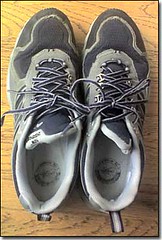 As for comfort, it is hard to beat some of the modern athletic shoes. I’m probably not alone in having tried several brands over the years. The Nike shoes are a little snug, but still comfortable, but have found that the New Balance are my favorites. They seem well made, are comfortable and hold up very well.
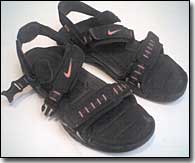 Both are amazingly comfortable although I have found that the sandals are better for ‘hot’ feet in the summer.
  With
With