Dew ladened spider webs

Posted By on June 15, 2009

Spider web with dew

While I’m in the “picture taking” mode, here are a couple spider webs taken while leaving the house this morning. The fog was heavy through the night after the thunderstorms on Sunday afternoon.

Dew ladened Spider web

Click photos for larger versions or here for largerst. Photo with Canon XTi & Tamron AF17-50mm.

Catching up on Geekbrief.tv on the Palm Pre

Posted By on June 14, 2009

Cali Lewis on Palm Pre

Spending a busy weekend away from the computer, but found time to catch up on some tech updates on my Palm Pre. Really I’d prefer watching video on a big screen, but I was impress at how well I was able to watch a couple YouTube videos and episodes of Cali Lewis on Geekbrief.tv. Very nice.

Automatic upgrade to WordPress 2.8

Posted By on June 12, 2009

The automatic upgrade feature in newer versions of WordPress software makes upgrading far easier than just a few version ago. I remember putting off the chore for months not wanted to hassle with backups and FTP uploads. Currently the step by step ‘semi-wizard’ approach works well and the switch to WordPress 2.8 last evening the same. I really appreciated the backup approach to databases before implementing the upgrade. After the 5 to 10 minute of clicking and reading explanations the chore was done.

As for major changes, I haven’t noticed them yet, but then again who reallywants a complete redesign???

Happy Birthday dinner and a couple more Palm Pre photos

Posted By on June 11, 2009

Yesterday was a busy day of business calls and traveling so I missed the chance to blog about my son’s birthday. Nevertheless, I’ll include a Palm Pre photo from my son’s birthday dinner — Happy Birthday Taylor. Taking my son out for his birthday tonight. Mmm. on TwitpicThe evening was nice as we enjoyed watching the Benihana chef cook the food in front of us while ‘freezing’ … the air conditioning was blowing directly on us.

I do like uploading to Ping.fm or Twitpic (left) as it provides a quick to upload photos to Twitter followers … or “peeps” to get my jargon correct. (the Palm Pre app Tweed will soon integrate Twitpic I’ve heard) 

Although I’m including the photo from Twitpic (no longer functional), I personally I still like Flickr for serving up files for sharing on my blog. Currently, the Palm Pre doesn’t support photo uploading to Flickr. The Pre does however included apps for photo uploads to Facebook and Photobucket; I tried them although still prefer to “email to Flickr” for the time being … I’m sure an app is in the works?

Speaking of photo tests, one of the functions I appreciate is being able to make a picture-copy of a  text page … more for just remembering what’s on the page than for a quality photo. Below was my test of an 8-1/2 by 11 page using the Palm Pre camera and a pair of 1.25 power reading glasses in front of the lens — click for larger  (this is an old trick I used on the Treo).

Close up image using 1.25 reading glasses

Battery life is going to be an issue with the Palm Pre

Posted By on June 9, 2009

Palm Pre Battery life— “Houston, we have a problem.” —

Some heavy smartphone device users may have a problem with the Palm Pre’s battery life. My initial road test is turning up some pretty questionable results (click photo at right – used 80% of battery in 4 hours). I left the house this morning for a day on the road about 7:30AM and proceed to mount my newly synchronized Palm Pre in the old Palm Treo windshield mount. (for those following my struggle to get my old data from Treo to Pre, I ended up using Google to sync data – neither Sprint’s tools or the Palm Data Transfer Assistant worked — PC or Mac)

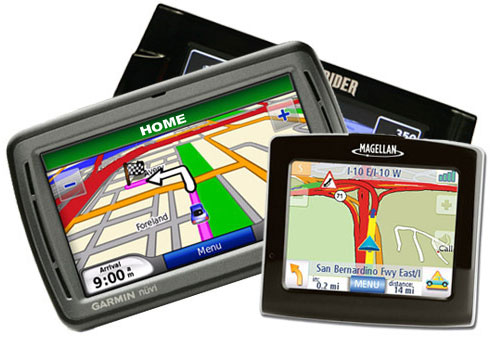
First item of business was to run the Sprint Navigation GPS app and plug in the first stop in Columbus Ohio. I watched in amazement as I was located a few seconds later and calculated the time of arrival while reading back the turn by turn audio directions … although the Pre has a ‘weak’ internal speaker (haven’t figured out if I can port the sound to a bluetooth device?). Next I checked Tweed (Twitter app) and looked to see that my Google calendar was syncronized from the previous night. After ‘flicking’ closed a few text messages and emails, I decided it best to focus on the road.
😯

About four phone calls and an hour into the drive from Cincinnati to Columbus, I realized that keeping the Sprint Navigation app running as a card in the background was going to quickly drain my smallish battery … remember I’m use to a much larger Palm Treo 700p battery. touchstoneI “flicked” off the navigation “card” and proceed to take a couple more short phone calls. After stopping at my appointment south of Columbus, I decided to send a Pre photo to Twitpic using the email app. I ran Tweed again, check stocks with the Express Stocks app and glanced at the browser to see that my photo had been uploaded. All good.

An hour later I found myself stopping for lunch and realized that my battery was down to 20% (see time and battery use on photo) … so either I need to cut back on my usage in order to make it an entire day or rig up a car charging setup as I did for my Treo. (Thanks Ernest for the thought on possibly making a homemade Touchstone-like charger for my car — any additional info would be appreciated.)

_

More fun with the Palm Pre and GPS in car use

Posted By on June 8, 2009

My new smartphone, the Palm Pre, is growing on me and although I’m slow to change the smooth skipping stone of a phone is growing on me. Productivity with it is not happening just yet since the keyboard layout has change over the Treo and Centro line (moved some keys around). I’m am surprised how much I miss the 4-way nav button on the Treo … or even a track ball (which wears rather quickly BTW according to users) on the Blackberries. Still, just like the iPhone, people can get use to sticking their fat finger between type or pinpointing  a small icon — I’m learning.

Palm Pre

I’ve made a few corrections in the comment area of yesterday’s post since I’ve since improve my ‘editing’ (copy/paste) with type; you hold the shift key down and finger swipe the area, then orange (opt) key with  ‘x, ‘c’ or ‘v’ key to cut, copy and paste.

Palm Pre with Treo mount

I’ve also posted a photo (with the packing skin still on!) running the excellent GPS and Google Maps. Sprint also packages their app called Sprint Navigation which is really good. Thankfully my old Treo windshield holder fits the Pre almost perfectly for GPS use … now to figure out how to rig a “Touchstone-like” induction charger to my holder! (keep me posted if you see them showing up or I’m liable to make my own)

One of the many improvement over other smartphones is that the Pre and Web OS can run multiple apps … probably as the sacrifice of battery life. In my testing, I was able to run the GPS mapping and talk on the phone keeping 9 cards open. Unfortunately that was my limit.
:mrgreen:

Palm Pre 9 apps is the limit today

Connected at Wendy’s WiFi in above photo

Enjoying a fire on the back porch & the new Palm Pre

Posted By on June 7, 2009

Fire on Porch

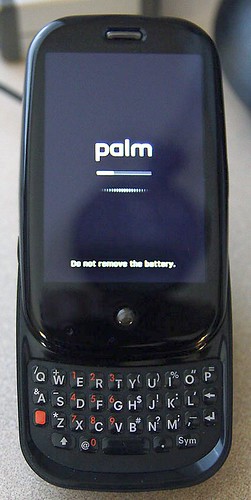
Enjoying a fire on the back porch and a some relaxation in the hot tub after a couple of graduation parties. Of course the highlight of my day was picking up the highly anticipated Palm Pre smartphone as a replacement to my Treo 700p. My first impression is WOW! … followed by a less enthusiastic … “hmm, there are going to be frustrations.” Nevertheless, I was excited to finally get the Pre and spend a few hours between graduation parties to play with it … before killing the battery. One of the really interesting ‘extras’ is the Touchstone charger which magnetically adheres the phone to the wedge shaped puck rather than plugging in a tiny USB plug for every charge. I can see that this is going to be a ‘must have’ accessory.

I’ll start with the top 5 great features and 5 not so great irritations:

Great:

  1. Design – from the small smooth size, sharp crisp screen, physical slide out keyboard and high quality packaging, Palm has outdone themselves … and maybe even Apple?
  2. Cards – the Web OS card and gesture feature make running multiple apps very easy
  3. WiFi – Shockingly I didn’t know how much I was going to appreciate having high speed network access beyond 3G phone connectivity.  A big plus.
  4. Bluetooth works very well. I placed my Pre on the Touchstone charger and walked through most of my house while talking on the phone. A great feature particularly since the headset switched seemed to work well. (Hmm … need voice-dialing now???)
  5. GPS with apps – This is going to be a really helpful feature. It located me to “the room” in my house based on Google Maps satellite view and was great for updating Weather using the super simple (although lacking) “Web OS Apps Store.”

Not so great … at least for now:

  1. Sprint porting of 3000+ contacts and several years calendar data (other info) from my old Palm Treo 700p did not work as I was told. Another person had the same problem while waiting there and with a shoulder shrug the Sprint Store tech didn’t know what else too do.
  2. One push speed dial and voice dial hasn’t been figured out yet … if it is available?
  3. Copy, Paste is on every menu … but I’ve yet to see it work on a single application. Email is very frustrating without it. On top of that, I’ve not been able to figure out how to “select” text either by the old “select all” command or touchscreen selection? This might be my problem but makes editing a doc or email very irritating.
  4. Editing of contacts that have been imported from other places … ie. Google, Yahoo, IM contacts.
  5. Camera – Although the camera creates nice photos, the inability to zoom — even digitally — was missed. The touchscreen only shutter release is touchy and the flash nearly worthless so far. It sure would be nice to be able to touch up photos and crop on the phone before emailing or uploading. Speaking of uploading … only Facebook and Photobucket is supported at the moment.
    😥

More to come later after I tinker some more.

EDIT 6/7/2007 PM: Adding a photobucket.com picture from Pre (cropped square with online tools to fit post)

Tootsie posing for Pre - no flash

_


A convoluted way to make FREE overseas phone calls

Posted By on June 6, 2009

Skype DLink to PhoneHere’s a “How-To” technique for making FREE computer to “phone” calls (not computer to computer) from overseas to any U.S. phone number. Its more the penny pincher in me which enjoys finding a way to use technology than the actual dollar savings since it hardly seems worthwhile for the few calls I “really” need to make. Still, when compared using the convenient — yet expensive ($1.50 min) Mobal.com GSM cellphone, making a call from computer to phone sounds pretty good.

Here is what I’m planning …

While using my notebook computer at an Internet cafe, hotel or hotspot location, I’ll remote into the desktop back in the U.S.  running Skype and a D-Link Phone adaptor. I’ve found that the easiest way is to use GoToMyPC, LogMeIn, etc type services … some with free service or at minimum trials. Using remote desktop, it is easy to modify the new D-Link DPH-50U‘s control panel used to connect the Skype computer to standard phones. Under the “Call Forwarding” tab (below), I can modify the “Number to Dial” (currently GOOG411) to the phone I wish to dial. After checking the “Call Forward” box I hit “Apply” and now incoming Skype calls will be routed to this phone number.

DPH-50U Utility

Next I use a separate Skype account to ‘dial’ my desktop PC in the U.S. and listen  to the forwarding after one normal Skype ring (ring number can be changed). The call is made using the standard phone line (no Long Distance in U.S. on my line) and the semi-conference call is made — Skype to Skype to Phone. So far in my testing, the calls have been clear and I’ve only noticed a slight loss of volume — but the calls are FREE and do not require the purchase additional Skype credits or Skype-out subscription plan.


John Kasich for Governor in 2010

Posted By on June 5, 2009

Q: How do we improve life for Ohio residents, attract business and bring jobs to our state?
A: With smaller government, lower taxes and by electing John Kasich (@John Kasich) to serve as governor in 2010.

kasichforohio.com


A few more thoughts on the Palm Pre as June 6th nears

Posted By on June 4, 2009

As a long time Palm OS user from Palm Pilots to Handspring Visors to Samsung i500 phones (my mother is currently using it) to the latest Treos and Centros … I’m waiting … and waiting … for the new Web OS … and waiting for a new physical keyboard PDA smartphone. The Palm Pre is almost here.

After reading and listening to Walt Mossberg (WSJ link) talk about the lack of an App Store, I started to wonder why it is really such a big deal? Frankly most business users want a smartphone to handle normal business tasks and need a good contact manager, calendar, some text messaging and strong email ability.

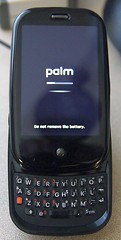
palm pre keyboardIt would be nice to have a few fun gadgets like music and video … or even a game or two for entertainment, but that’s not necessary really. Perhaps it is because I don’t have a iPhone that I’m not all that interested in the “App Store” thing and will be just as happy to have a few good quality productivity enhancers that help handle normal business tasks.

My biggest concern is the lack of a memory card for the growing sizes of data as video, music, podcasts and mapping databases come to mind. I’m sure I’ll want to store additional programs since not everything is going to run wirelessly from the cloud and I assume that the normal OS bloat will eventually come Palm Pre’s way. Even the iPhone is now doubling their  memory … and frankly speaking as cheap as memory is nowadays, I’m shocked to only see 8GB on the Pre? (I suspect generation 2 is not all that far away?)

Thankfully I’m a Sprint (only carrier this year) customer with very good 3G coverage almost every where I regularly travel (except Europe this summer) and have been ready to retire my trusty Palm Treo 700p … although would have probably been happy with a Blackberry realizing what I use a smartphone for; that said, unlike the iPhone I be glad to able to be able to open an “flick through” multiple programs, use a physical keyboard to enter text or handle emails, replace the battery if need be and still be able to slip a smooth skipping stone looking smartphone into my pocket. Stay tuned … June 6th is coming.

Palm Pre iphone compared

_

Desultory - des-uhl-tawr-ee, -tohr-ee

  1. lacking in consistency, constancy, or visible order, disconnected; fitful: desultory conversation.
  2. digressing from or unconnected with the main subject; random: a desultory remark.
My Desultory Blog