Earthhour … will you be participating?

Posted By on March 30, 2008

earthhour
Since this is a politically hot topic, I’m just going to only briefly mention Earthhour. It is a publicity event taking place around the globe Sunday which aims to draw attention to the environment and climate change issue. Not everyone is on the same “global warming” page as to the cause, but the majority of informed citizens are at least concerned enough to want to make positive choices when it comes to their environmental impact. Millions around the world are connecting today by turning their lights off for one hour at 8 PM (in their time zone) in unity around this cause … and they are hoping to encourage governments, industry and average people to improve their energy use and policies. If you are of the same spirit, consider turning your lights off tonight for an hour.

Cute Babies Do’s and Don’t labels

Posted By on March 29, 2008

I’m too tired to type much of anything, so will just include a “baby label” and link to a list of Do’s and Don’t with Babies.

null
Here are a few more labels

Sugarsync Backup and online Sync service

Posted By on March 28, 2008

SharpcastAbout a week ago, Sharpcast introduced SugarSync, their new automated Internet backup and synchronization service which allows computer users to backup directories online and also sync multiple devices. (ie. laptop, office computer, home computer) The convenience of keeping 10 plus gigabytes of data safely backed to a server and available on multiple computers ‘might’ be attractive to people on the go. Since there is a 45 day trial period and a 50% off ‘Founders Circle‘ pricing for those who sign up before April 15th, I decided to give it a cross-platform try.

Sugarsync

I’m not sure that even with a discount that I’m interested in paying for an online backup service as I can quickly FTP files to a server or better yet store on a low cost USB or Firewire harddrive. I’ve seen several online back up services, which offer 30 gigabytes or so for $10 a month, although the ease of backing up multiple computers and synchronizing the way Sugarsync does is pretty attractive. I wouldn’t mind having at least 10 GB backed up automatically if it were free, but I’m not sure I want to spend $25 (discounted rate) for the first year and then $50/year after I get addicted?

But onward and upward with the trial. The signup with an email address and password was simple, the software downloaded in a snap on both my Vista notebook and desktop Mac, and even the installation went without a hitch … but that was where quickness stopped. Next was the backup and sync of my two computers, and I only selected 4 GB of data to start with. Can you say bog? The reality is that I would have been much wiser to do this initial sync while I was sleeping … it slowed the entire network and Internet connection down substantially. (my advice … do the initial backup at night)

Once backed up, the service works flawlessly. I can open any file on either computer and so as long as I allow the SugarSync software to run and update changed files. At this point I have started to question the security aspect of handing off my private files to an Internet backup service, but suspect I could be wooed into feeling they are safely stored? (who can really guarantee that?) It is pretty cool to watch a modified file change only a few seconds after I save it on one computer then show up on the other. As an added bonus, I’m also able to access with my Treo 700P smartphone with the Blazer browser … although working with the files isn’t all that easy. (although I can pick a file from the back up location and have it emailed to whom ever I want!) The SugarSync site indicates that their service plays well with Windows mobile devices and Blackberries … I wouldn’t know since my Treo is Palm OS.

All and all for a first look I’m impressed. Its not for everyone considering this could get costly and offer a security breach, but I’d have little hesitation in suggesting it to those considering any other online back up service. Be warned, backing up 250 GB this way will eventually run you about $500/year once the Founders Circle discount runs out.

About

EDIT 4/2/2008: Received and email indicating the ‘Founders Circle’ pricing will be the ‘list price.’

Dear SugarSync Customer,

Thank you for trying SugarSync. Since we’ve announced our pricing, many of you have spoken that you love the SugarSync experience. Over 27 million files have already been synced! But for some of you, the pricing is not affordable enough for you to enjoy it for all your files and media.

Well, we listened to your concerns and as of today, the Founders’ Circle promotional pricing is now our everyday low price. You can subscribe to a SugarSync plan for as low as $2.49/month. There is no promotional period or fine print to worry about. For one low price, you can protect and enjoy your digital life wherever you are.

We hope this will convince you to subscribe and enjoy SugarSync for a long time.

Great White Shark following Kayak poster

Posted By on March 27, 2008

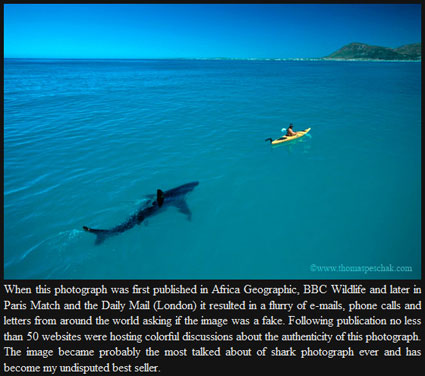
Great White tails a Kayak
This is an older photo that was published in African Geographic in December 2006, but I saw it framed on an office wall and thought it was pretty cool. Can you imagine Kayaking and being tailed by an interested Great White Shark? (by the way … its real — click photo for larger scan or it is available here in poster form.)

I was suspicious as to it being real … so had to check it out myself. (see link)
Shark Kayak
This amazing photograph shows a great white shark trailing a man in a sea kayak. The photograph’s caption explains:

Sitting in a 3.8 meter sea kayak and watching a four meter great white approach you is a fairly tense experience.

Although some have doubted its authenticity, the photograph is genuine. It was taken from the September 2005 issue of Africa Geographic. The article details a study of Great White Sharks in South Africa by biologists Michael C. Scholl and Thomas P. Peschak. Kayaks were used to study the sharks because, unlike the motorized research vessel, they could manoeuvre more easily in shallow or treacherous water and had no engine noise to disturb the sharks’ natural behaviours. The authors explain more about the incident shown in the photograph:

Although we had extensively tested the sharks’ reactions to an empty kayak and had observed no signs of aggression, this gave us little comfort as we eyed a great white heading straight for us, albeit slowly. Just a metre or so from the craft it veered off, circled and slowly approached from behind. It did this several times, occasionally lifting its head out of the water to get a better look. Then it lost interest, and as it continued on its way we were able to follow a short distance behind. Once we’d come to terms with having nothing between ourselves and a four-metre shark except a thin layer of plastic, our kayak made an ideal research platform for observing great white behaviour in shallow water.

The article provides a very interesting insight into Great White Sharks and includes a number of other excellent photographs.

Sharky Shores

Shuttle Endeavour returns safely to Florida

Posted By on March 26, 2008

Endeavour returnsThe space shuttle Endeavour was picked up on infrared camera gliding back to earth on Wednesday evening at the Kennedy Space Center after an ambitious an successful mission to the International Space Station. The crew spent 16 days on 5 space walks and installing the first part of the Japanese Kibo laboratory, as well as putting together a Canadian built maintenance robot. The returning Endeavour crew includes French astronaut Leopold Eyharts, who spent seven weeks aboard the space station setting up Europe’s new Columbus laboratory. He was replaced by NASA astronaut Garrett Reisman. NASA plans 10 additional missions to the Space Station before retiring the shuttle fleet in 2010. The next planned mission is to upgrade the Hubble Space Telescope later this year.

YouTube improving video quality

Posted By on March 26, 2008

Earlier this month I noticed that the online video sharing giant YouTube was improving the quality streams for some of its content. (it is about time) They have started by offering an extra link at the bottom of some videos offering higher quality streams.
Watch higher quality
Another technique to try is by adding a bit of code to the end of the URL: Better=”&fmt=6” or Best=”&fmt=18
EDIT: Test video for comparison: Low Quality v. High Quality.

I’ve been trying to decide if these improvements are really noticeable when encoding on my end, but haven’t been able to justify any quality improvements. I’ve adjusted my raw encoding in order to send much large ‘less’ compressed video to YouTube, although find that the upload times are hard to justify in order to gain only slightly in quality.
youtube compare
I’ve watch content providers like Hulu and the major television networks stream some pretty impressive Flash encoded clips, and expected to see something similar from YouTube … I haven’t seen it yet. There are other ‘free’ video streaming site which have superior video, like Blip.TV, Brightcove, Vimeo and DiVX, but I still find myself returning to the more popular Google owned YouTube. I do suspect that the shear volume of encoding requires much faster compressors and streaming which might have something to do with their quality shortcoming? Combine that with what most people are uploading (quality of original video) and the maximum bandwidth available, and high quality is probably not going to be close to that of a professional studio working with raw digital footage.
Case for Christ
Here my testing below using a DVD for digital quality original (Lee Strobel‘s book Case for Christ made into a DVD movie) … the first 3 minute intro clip is encoded .mp4 in the recommended size and frame rate for YouTube — the second is a Flash encoded and privately streamed version.


TV series Jericho ends tonight on CBS

Posted By on March 25, 2008

Jericho
Of the two television programs I watch, one will end tonight: Jericho. The final episode will conclude at 10PM eastern time to a outraged fan base. Last year the show was cancelled, but when fans united to petition CBS for its return, executive gave it a second breath. (link)

Unfortunately, the number of viewers were not enough for the network and even through the nuts and well done second season of drama. This seven episode second season will be its final. If you’ve been watching, it has seemed rushed and will end way too soon for me. According to entertainment news reports, the crew wrote and filmed two endings … one more conclusive and one prepared for a third season. That said, the more final conclusion still leaves room for the possibility of “Jericho” finding a second life on cable. Oh … and thank you Sprint for advertising for Jericho …

Sprint

Apple Safari Browser for Windows

Posted By on March 24, 2008

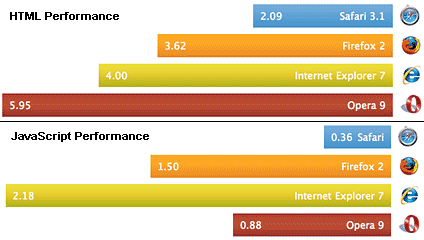
SafariNow that Apple’s excellent Safari 3.1 Browser for the PC is out of beta, I figured it was time to give it a try … and its fast — faster than IE and Firefox in my quick look at surfing through sites. Apple’s promotional graphics seem to show the same thing too. (below) I’m not sure how one goes about making a browser respond faster to navigation and clicks, but its an excellent browser not only on the Macintosh line of Apple computers, but now on the Windows OS platform. As a disclosure, I run Vista OS (SP1 updated) on my notebook computer and usually Mac OS Tiger on my desktop, although I have an older Pentium Windows 2000 machine and OS 9 G4 Mac available too.
Browser Comparison for Speed

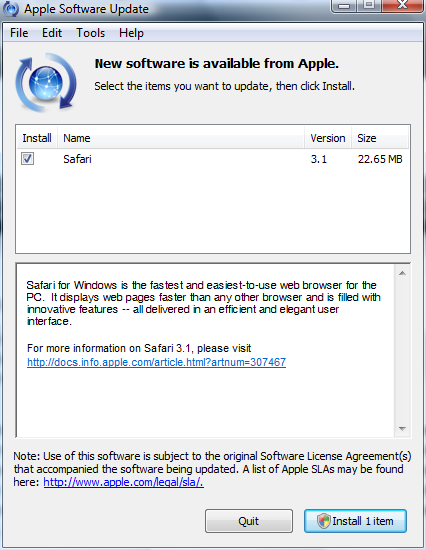
My first impression was that the software downloaded and installed better than other Apple software for the PC using “Apple Update”, most notably Quicktime. (QT is nearing RealPlayer for distasteful software) After installation the browser started without a problem and asked if it could become my primary browser, grrr — not yet Safari, you have to earn your place behind my preferred Mozilla Firefox 2.0.0.12 browser. (I’ve yet to upgrade to the current Mozilla Firefox 3 beta) As I mentioned, the first thing I noticed was that it was faster.
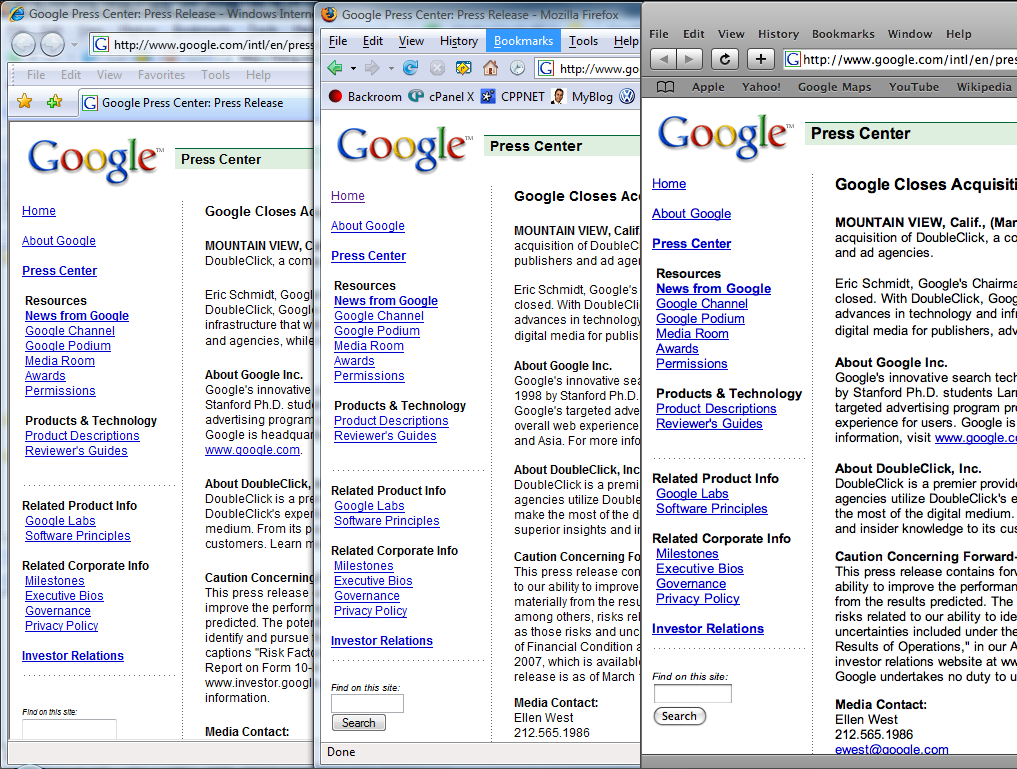
CLick for largerThe second thing I noticed was that the graphics on my Vista OS notebook seemed smaller the normal browser text view, and it didn’t seem as crisp. Click on the graphic to the right for a full size browser comparison showing IE 7, Firefox 2 — both at “one” setting smaller than normal — and Safari — set “normal” text setting. I do like the size of the title bar on Safari as it is less obtrusive, at least until I start loading it up with buttons, bookmarks, etc. From user stand point this smaller title bar and thinner status bar (off by default) really helps make the most out of a widescreen notebook computer as vertical screen real estate on most new notebook computers is a valuable commodity. According to Apple, the “clean look” was purposeful and “lets you focus on the web instead of your browser.”
Browser features security
Security:
Another major concern for Internet users is how secure is a particular browser, especially with scripting and encryption of data being passed between your computer and the appropriate webserver. Safari is easily as security of other leading browsers and might offer the advantage that they are not the most popular and attacked by hackers? Secure connections (SSL and TLS) are noted by the window’s lock icon … which is at the top, providing even less of a reason to keep the status bar constantly displayed.
apple safariThe progress bar which is often displayed in the status bar is also moved to the top and is creatively displayed in the URL box as the page downloads to your computer. Pop-up blocking is also included and will be appreciated as an integrated part of the browser as will a “private browsing” feature. (doesn’t cache your information — you can probably do the same by using “empty cache.”)

Several other goodies are helpful, like automatic forms filling, a snap-back feature for searching, a built in RSS feed reader and the easiest to use bookmarking system. (although I still like something available on any computer like Del.icio.us)

Conclusion, after one day: Safari is an outstanding browser with very impressive speed. Still, it will be difficult for me to switch from Firefox (PC or Mac) as I have become really comfortable with the Mozilla open-source products. Perhaps I’ll see just how I like Firefox 3 runs, and see how bloated it becomes, before making a decision one way or the other … for now, I ‘ll keep it installed on my PC.
Download

Senator John McCain: His life

Posted By on March 22, 2008

John McCain Timeline
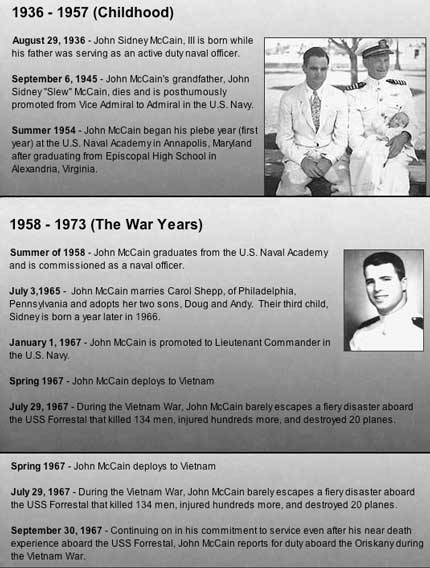
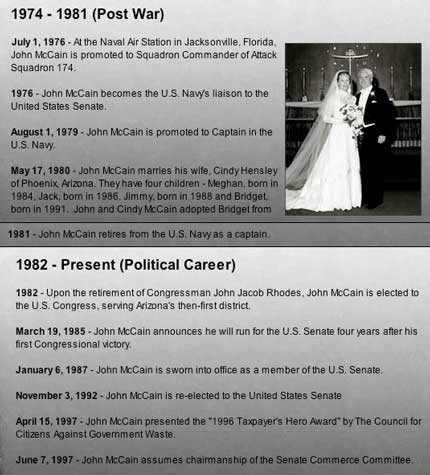
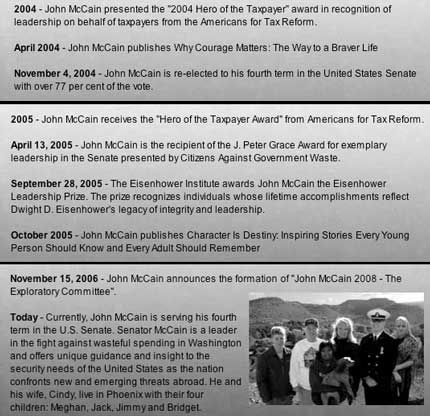
The Republican Party snagged me in asking for support ($$$) for John McCain’s upcoming Presidential run. Although I side-stepped the campaign donation, I did say that I would encourage others to learn more about him. To start with, I’m including a “timeline” history of John McCain below. He and his fatherand his grandfather, served the United States honorably … and from where I stand, that’s a good starting point for a Presidential candidate.

John McCain Timeline p1
John McCain Timeline p2
John McCain Timeline p3
John McCain Timeline p4
John McCain Timeline p5

Microsoft Vista SP1 update went slow, but well

Posted By on March 21, 2008

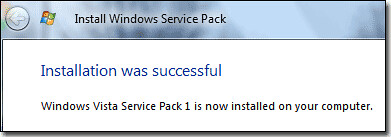
successfully

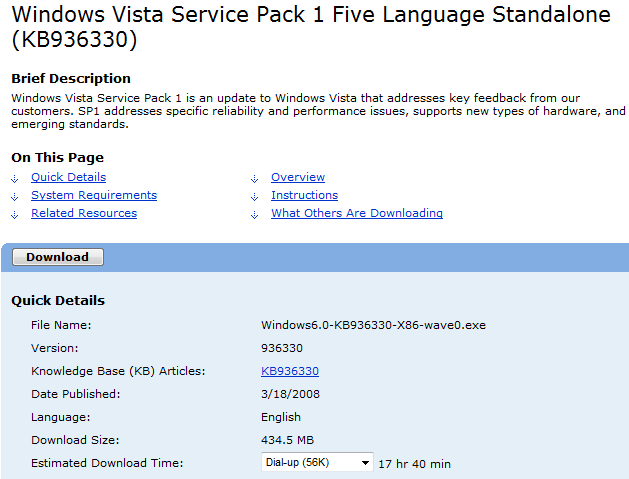
After work today I opted to download the large 434MB SP1 stand-a-lone update installer. The download went swiftly since the broadband connection I was connected to was a bit faster than dial-up. (Beware … if you dial up and the download, it could take 17 hours — click highlighted to see full image)
downloadMost using Microsoft’s “Windows Update” will not receive the SP1 update until mid-April unless they visit Microsoft.com and download the update. Besides the long download, its advisable to back up your computer and have plenty of time to do the install. Mine took over an hour, but in the end was successful.

The updates address three different areas according to Microsoft: security, reliability and performance improvements. I’ll include the changes summarized in BetaNews.com.

Security Improvements

  • Provides security software vendors a more secure way to communicate with Windows Security Center.
  • Includes application programming interfaces (APIs) by which third-party security and malicious software detection applications can work with kernel patch protection on x64 versions of Windows Vista. These APIs help ISVs develop software that extends the functionality of the Windows kernel on x64 computers without disabling or weakening the protection offered by kernel patch protection.
  • Improves the security of running RemoteApp programs and desktops by allowing Remote Desktop
    Protocol (RDP) files to be signed. Customers can differentiate user experiences based on publisher
    identity.
  • Adds an Elliptical Curve Cryptography (ECC) pseudo-random number generator (PRNG) to the list of available PRNGs in Windows Vista.
  • Enhances BitLocker Drive Encryption (BDE) to offer an additional multifactor authentication method that combines a key protected by the Trusted Platform Module (TPM) with a Startup key stored on a USB storage device and a user-generated personal identification number (PIN).
  • Reliability Fixes

  • Improved reliability and compatibility of Windows Vista when used with newer graphics cards in several specific scenarios and configurations.
  • Improved reliability when working with external displays on a laptop.
  • Improved Windows Vista reliability in networking configuration scenarios.
  • Improved reliability of systems that were upgraded from Windows XP to Windows Vista.
  • Increased compatibility with many printer drivers.
  • Increased reliability and performance of Windows Vista when entering sleep and resuming from sleep.
  • Performance Improvements

  • Improves the speed of copying and extracting files.
  • Improves the time to become active from Hibernate and Resume modes.
  • Improves the performance of domain-joined PCs when operating off the domain; in the current release version of Windows Vista, users would experience long delays when opening the File dialog box.
  • Improves performance of Windows Internet Explorer 7 in Windows Vista, reducing CPU utilization and speeding JavaScript parsing.
  • Improves battery life by reducing CPU utilization by not redrawing the screen as frequently, on certain computers.
  • Improves the logon experience by removing the occasional 10-second delay between pressing CTRL-ALT-DEL and the password prompt displaying.
  • Addresses an issue in the current version of Windows Vista that makes browsing network file shares consume significant bandwidth and not perform as fast as expected.

    Desultory - des-uhl-tawr-ee, -tohr-ee

    1. lacking in consistency, constancy, or visible order, disconnected; fitful: desultory conversation.
    2. digressing from or unconnected with the main subject; random: a desultory remark.
    My Desultory Blog